
Opus 4.5 Codes, Gemini 3 Writes the Copy, Nano Banana Pro Generates Images, and I Sit Here Slack Jawed
It's not even close at this point. The machines are better at my job than I am.

The internet’s been abuzz about Claude Opus 4.5, so I finally decided it was time to renew my Pro subscription and give it a try. Since all of the SOTA models are so good these days, I needed a better test than just throwing some hard questions at it. With Nano Banana Pro now able to handle most of the image generation needs for my Amazon brands, I thought I’d give a go at using Opus to build some scaffolding to streamline that process.
Spoiler that you can probably guess from the title: It went well.
A product listing on Amazon requires 6-8 images. The first must be a plain photo of the product on a white background. The rest can be whatever you want, but generally infographic-style images perform best (people don’t read, so if you want to convey important information about your product, you need to do so in the images).
When I take over a listing, the most common case is that the seller has a bunch of professional photographs of their product but low-quality listing images, often clearly homemade. This is weird, since product photography is expensive and listing images are not (I pay a guy $35/image, and switching to his images is often worth four to five figures a year in profit).
Anyway, my process is pretty straightforward:
Write a short document that describes all of the benefits and positive qualities of the product, as well as any important information a customer should know (e.g. size, how to use it).
Come up with five or six ideas for listing images and write down a spec for each of them. These specs range in specificity — in some cases I have very specific ideas about what photos and graphics I want, where in others I’ll just put down a title and a few bullet points. If I have thoughts on the overall visual style I want, I’ll add those, but usually I don’t know what I want on that front.
Send these to my guy on Upwork.
Not a wildly complex process by any stretch, but since the whole purpose of this Substack is to see if I can automate my entire business, seems like a good process to give to Claude.
Let’s Automate It!
I’ve heard good things about Claude Code, so the first thing I decided to do after my subscription was install that. I immediately realized I didn’t have any idea how to install it, so I asked Claude how. It was actually a little more involved than I expected; not hard, but I had to go modify a Windows environment variable, which is not a thing I’ve done before. Luckily, Claude gave me great instructions and I was up and running in no time.
Here’s the first prompt I gave it:
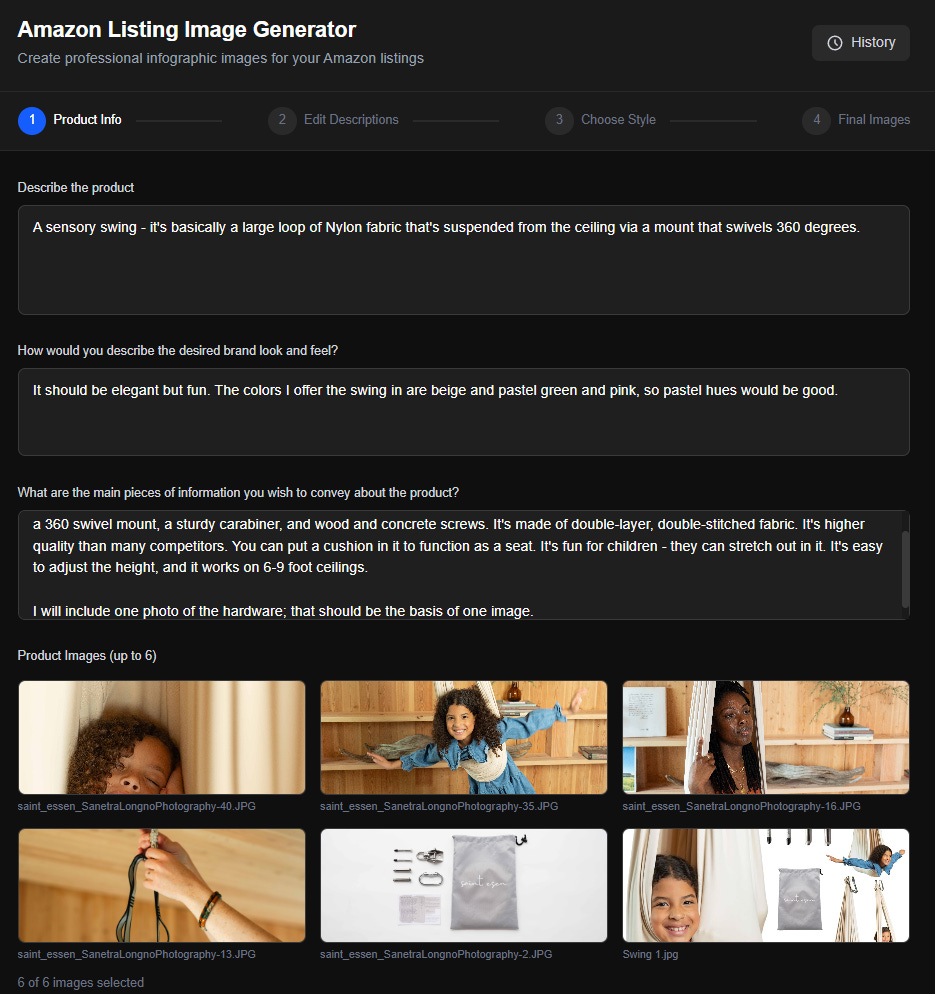
I would like to build an application that generates images for Amazon listings. These will be infographic-style images that have photos of the relevant product along with informational text and/or graphics.
The application should work as follows:
1. User fills out a web form with the following info:
Text entry: Describe the product.
Text entry: How would you describe the desired brand look and feel?
Text entry: What are the main pieces of information you wish to convey about the product?
File picker: Select and upload up to 6 images. You should be able to select files at which point previews of them are shown. You can add more and delete existing ones.
2. The app then sends all of the text to the Gemini API (mode: Gemini 3 Pro), which comes back with a written description of six different images that it proposes creating. The written descriptions should include any text (with high-level formatting notes about each piece of text - e.g. Title, subtitle, bullets). They should also describe any visuals that must be included in each image. Lastly, it should have a separate section that shows the proposed look and feel, including colors, font styles, and any illustration/iconography styles. Each of the image descriptions should be in its own text box, as should the look and feel info, and the user should be able to edit any of them.
3. When the user is satisfied with everything, he clicks a “Generate Style Examples” image. This should create four versions of the first image in the list. These should each be created with independent calls to the Nano Banana Pro API. The objective here is to give the user multiple style options to choose from, which will then be used to generate the remaining images as well. The results should be shown on the same screen as the text description and style boxes, so the user can go back and edit them if he doesn’t like the results. The CTAs here are “Reroll”, which gets rid of the four existing images and creates four new ones, or “Use This Style”. The user should be able to click on one of the generated images to highlight it, and only if an image is highlighted should use this style be active. When use this style is clicked, the app should make calls to Nano Banana Pro to generate the other five images. Those calls should include the selected image with instructions to NBP to match the style. Each generated image should have a Reroll and a Download button next to it. There should also be a “Download Style Reference” button to download the first image that was created.
Other context:
1. This is going to run locally on my machine so no concerns about auth, security, etc.
2. All images generated should be in 2k resolution and 1:1 aspect ratio
It asked a few questions along the way and expressed skepticism that there was a such thing as Nano Banana Pro. I answered and pointed it to the docs, and a few minutes later I had my application.
I want to say it one-shotted this, but when I clicked the Generate Style Examples CTA on the first screen, I got an error. I gave Claude the terminal logs, and it identified the issue, which was that it had hallucinated the model names for the API request to Gemini.
It changed them to valid ones, except it tried to go with version 2.5 of both Gemini Pro and Nano Banana. On the one hand, its training data probably has a lot of references to those model names and none to version 3 (its knowledge cutoff ends before they launched). On the other hand, I was very clear about which models I wanted and gave it the NB docs, so I definitely wonder if it was trying to subtly sabotage my impression of Google’s models by using worse ones that I expected.
Once that was fixed, it just worked!
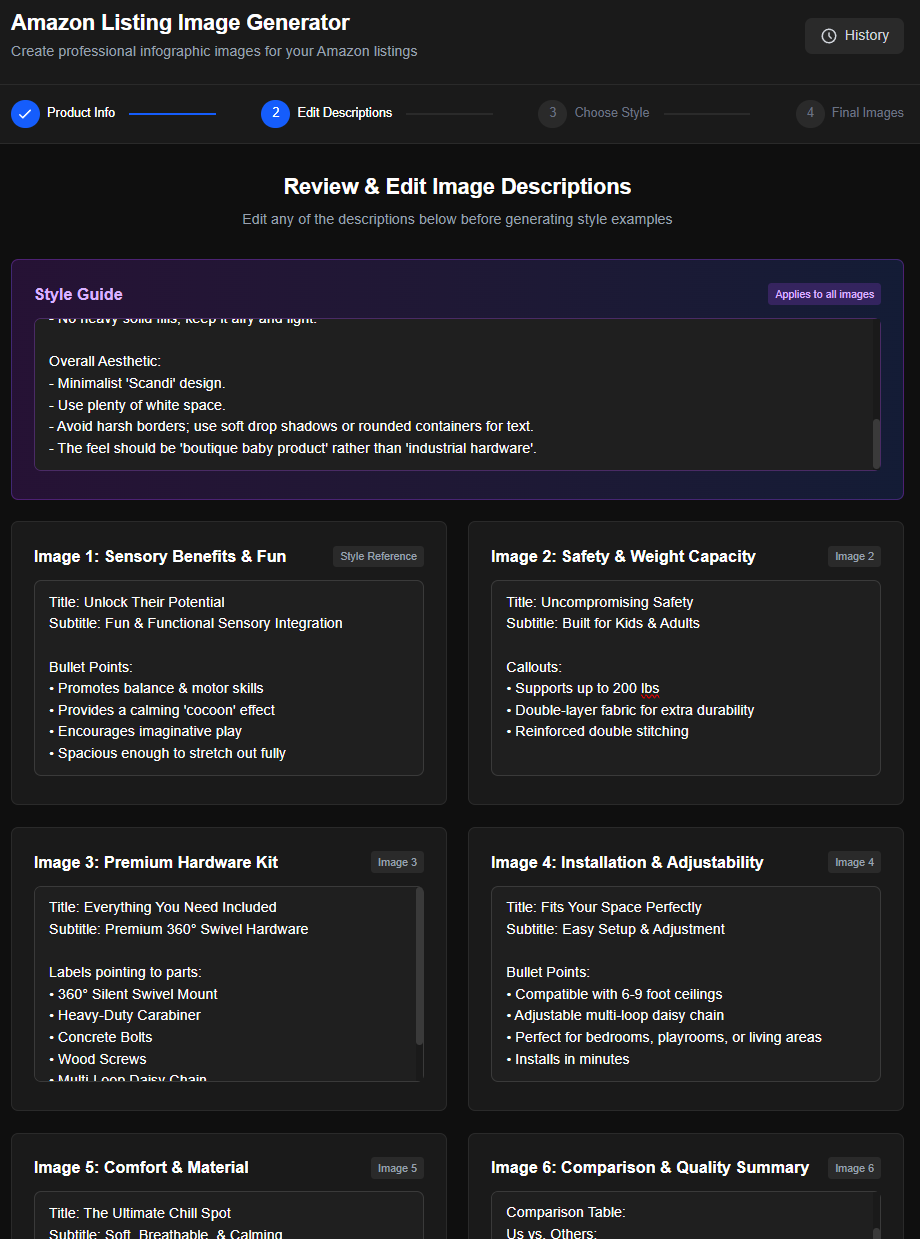
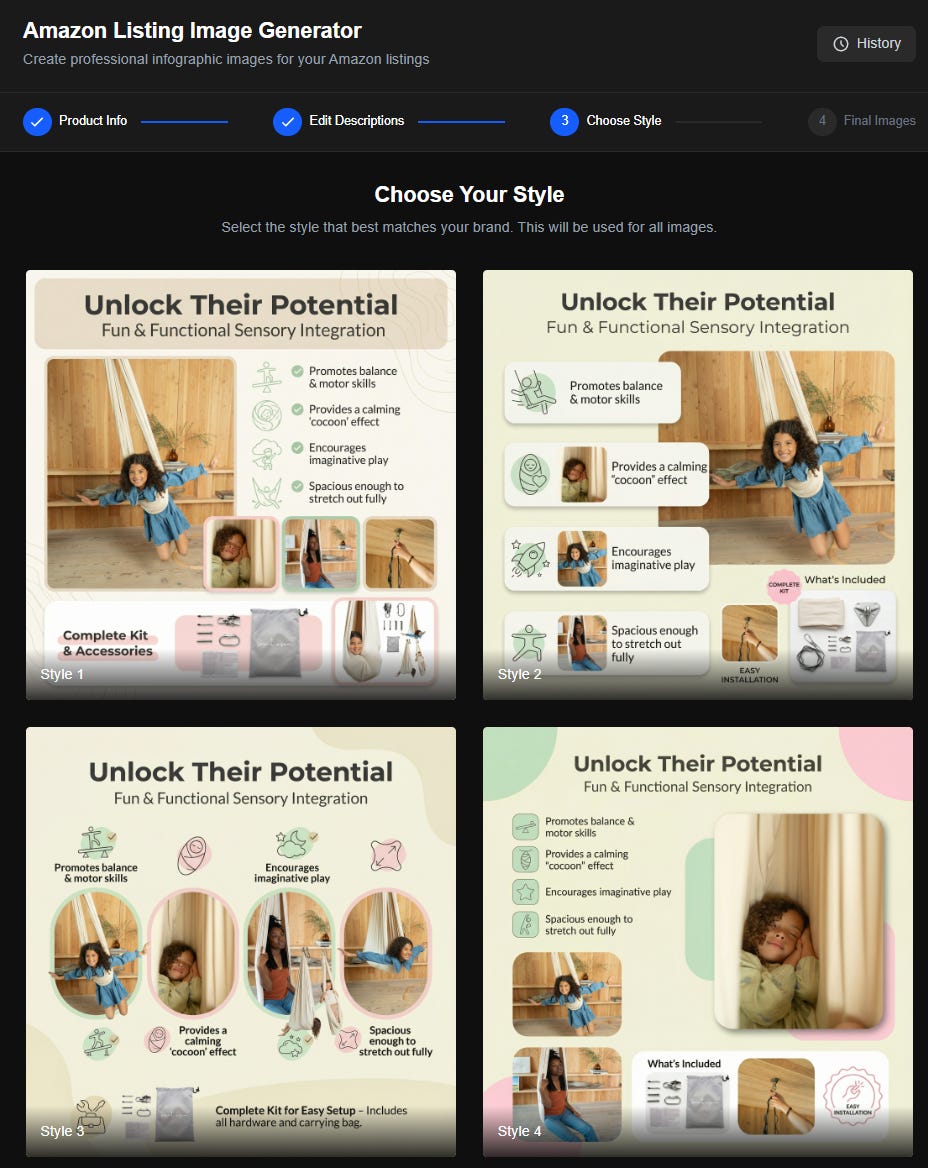
These are really good! I love the one in the bottom left corner, but the images of a girl in the swing that are overlaid on the third oval from the left seemed out of place, so I had it remove those. Final result:
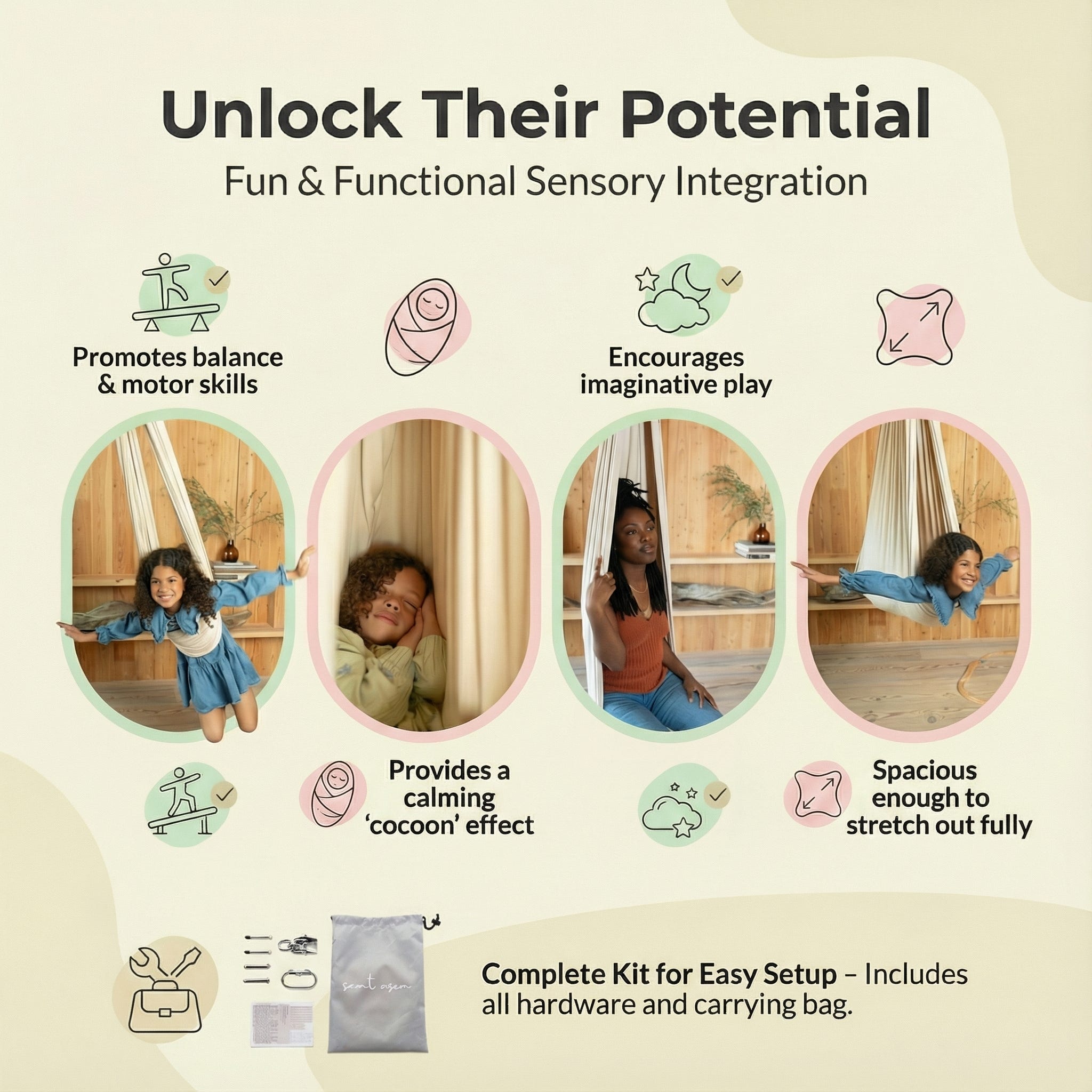
Let’s take a second to go over all of the little things that it’s getting right here:
The pictures generally match the captions. The one on the left shows her swinging in a way that requires some balance/motor skills. The second one shows her cocooned in it. The third one is definitely the least good, but in fairness I didn’t give it that many photos to pick from. The fourth one shows her stretched out, just as described in the caption. This is pretty impressive!
It created icons that match the text really well and maintain a consistent style.
In the first and last pictures, the girl’s hands and knees extend out past the edge of the oval. Just a nice little design touch.
I’m sure there are designers out there who will tell me why this is terrible, but in the grand scheme of Amazon images, it’s great. Plus, what ultimately matters here isn’t anyone’s opinion, but rather the actual impact on conversion rate. Amazon has an A/B testing framework, so I can just keep trying new styles until I find one that always wins head to head.
Here’s the six it generated using that style:
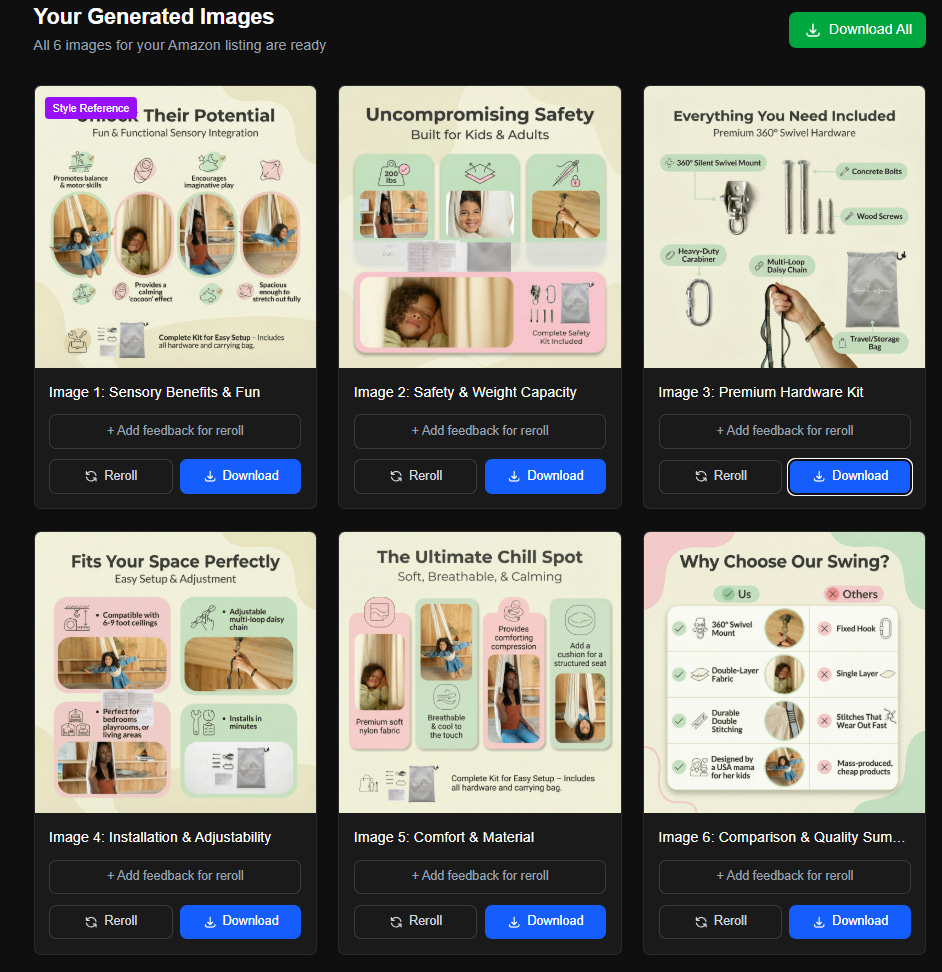
A few minor issues, but one big thing I notice is that it’s reusing the same photos in the images. I asked Claude to up the max number of photos I could upload on the first screen to 20. Problem solved.
That’s been the notable difference between Opus 4.5 and prior models I’ve used for vibe coding (primarily the GPT family, including the most recent GPT-5.1-Codex-Max) — things just work with Opus. I ask it to add something, it adds it, and it works as expected. I think there are 3 total times when I’ve encountered a bug, and it fixed all of them on the first try.
In all of my past vibe coding, I’ve spent a pretty significant amount of time feeding logs back to the LLM and trying to diagnose issues. Since CC runs the application in the background, it can check the console logs itself, so I don’t have to copy and paste them. It’s tough to understate what a UX win that is compared to some of my experience with GPT.
There’s also always the concern that any change is going to break something existing, so I’ve been testing the core functionality after each change. I won’t go so far as to say Opus 4.5 isn’t going to have those issues, but so far, so good. Every time I think of something I want, I just ask and it’s implemented in a few minutes. Save all generated photos and give me a gallery where I can view all of them? No problem. Let me give it a reference image with a style I like, and have it use that instead of coming up with its own style examples? Done perfectly on the first try. Nothing touched that it wasn’t supposed to touch.
As someone who spent a decade in product management, this thing is the dream engineer. Not to say I don’t love the majority of human engineers I worked with, but they just can’t compete with the speed of iteration here. I also don’t have to feel guilt about wasting engineer time — I can just throw ill-defined ideas for functionality at it, see what I get and then ask for changes. If I wrote requirements for my PM work as lazily as I do here, I would absolutely get fired.
Google Models
I’m sure you can tell that I’m blown away by Opus 4.5, but let’s not forget about the Gemini side of things here. I’m using Nano Banana Pro for image generation and Gemini 3 Pro to review the information I provide (both text and images) and come up with the content for the listing images as well as the prompts for NBP. I went with NBP because it’s clearly the best model out there and G3P just to keep it in the family.
I’ve gushed plenty here about NBP, but it’s worth noting that G3P is really, really good at its role here.
I often struggle to come up with enough positive things to convey about my products through the images. One thing I sell is a plush firepit toy for children. How much do you really expect me to say about that? It’s a plush toy! You can see what’s included in the pictures! Do you want me to explain what a plush toy is? Come on. This should not require explanation. Just buy it.
And yet G3P managed to come up with ideas that even I concede are pretty good. Here’s one where it identified the specific materials and came up with an image to call those out (which I will note was perfectly executed by NBP):

Here’s one that’s a nice way to help parents think about how their kids will actually play with this. Nothing revolutionary here, but any time you can get your customer to picture themselves (or their kids) using the product, you up the likelihood that they’ll buy it.
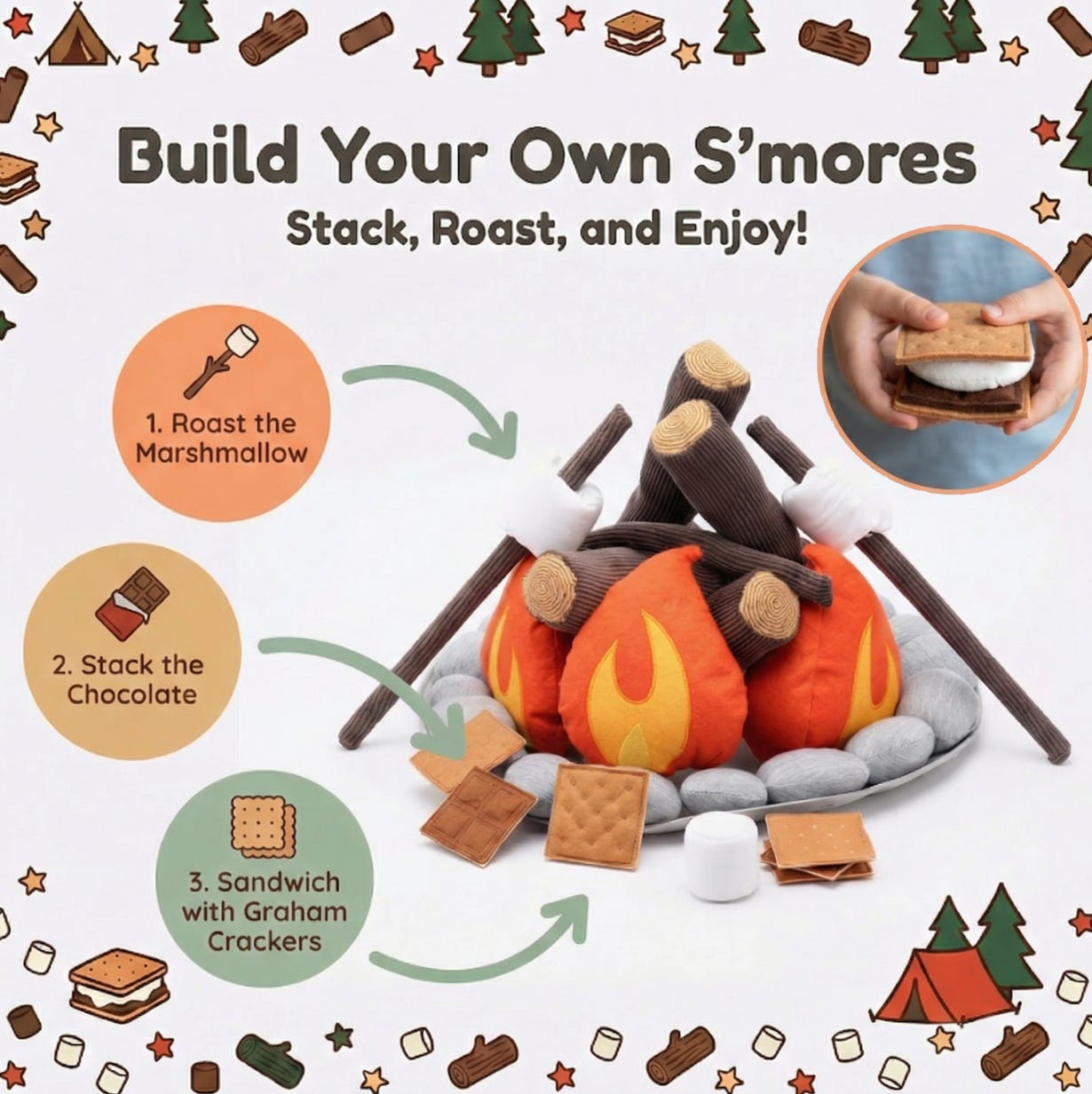
The thing that gets me about this one is that not only was it more creative than I was in coming up with this, it was also able to infer that kids would build s’mores with this just based on the pictures of the fire pit. The word s’more was never used in any of the information I gave it. How can you not be blown away by that?
The combination of G3P and NBP really works well here — G3P describes the layouts, content and font types in detail, and NBP is almost always able to execute them exactly as described. NBP is also excellent at taking a sample image as input and applying its style faithfully to the content (mostly… I will admit there’s sometimes a bit of variance in things like title font weights and colors, but usually if you just reroll the image once or twice you get what you want).
More Code, Claude!
I started writing this post before Christmas, and I’m going to hit publish a couple of weeks into January. The delay can partially be blamed on holiday family things and then the need to wrap up some business stuff after the year ended, but to be fair, I did find plenty of time to keep telling Claude to add stuff. I definitely could’ve finished this post in the downtime when I hit my rate limits, but instead I upgraded to Max. Mea culpa. I honestly can’t think of the last time I’ve had this much fun while also doing something genuinely productive.
I have added:
Single image generation: Sometimes you don’t need a full set of images, just one more that matches them. Give the app a style reference image, product photos and content, and get a new image. If you don’t know what you want, you can tell it what images you already have and ask it to come up with something new. Works great!
Image to image: Since I’m using this for A/B testing, I often want to test the same content but with different styles. Here I can upload the existing listing images, and it’ll pull the content then generate new versions in a different style.
Whitebox photos: In a couple of cases, I didn’t have enough product photos, so it kept reusing the same ones. So I built a quick flow to give it some product photos as inputs and get whitebox photos as outputs. You can describe what you want in plain text (e.g. “one from above, one from behind, a couple from directly above”) it G3P parses that and creates individual prompts to ensure each request is captured.
Next I’m going to attempt to turn this into a SaaS application that others can pay to use. I’m not really intending to turn this into a business — this is mostly an attempt to see if Claude can walk me through everything needed to add all the necessary features (auth, Stripe integration, etc.) and get it deployed.
These are crazy times. GPT-3.5 was released just over three years ago, and it the fact that it was able to generate some short Python scripts was nothing short of astounding. I am no expert in timelines or predicting AI capabilities, but if AI makes the same amount of progress in the next three years that it made in the last three… that’s going to be wild.
Great post! It’s so impressive that we can move from experimentation to actual product prototype in a matter of days now without having to depend on engineering talent. I’m a product manager as well, and the empowerment I get from CC is just amazing. I’m able to build/tweek/rebuild just on a whim!
Would be keen to read how the SaaS build goes!
Great article here!
Your sentence about GPT 3.5 made me think about this: The SWE benchmark’s results went from 40% to 80% in something crazy like 11 months. And it just keeps getting better and better.
Again, amazing article!