
Using Cloudflare's Agentic Interface to (Mostly) Seamlessly Launch a Website
A small task, but a nice peek into how things may look when our agents are taking care of tedious tasks in the background.

I recently had to set up a website. Unlike most of what I write about here, this one was not related to my business. A group of my college friends decided to plan a trip for our collective 40th birthdays next year, and we needed to figure out where to go plus do all of the other requisite planning.
One guy set up a Google Sheet where people could fill out preferences, but I wasn’t about to let that be our main planning tool when I’ve got access to Claude Code. A world of effectively free engineering work should be a world where we have a little fun with the stuff we do online! Besides, it presented a great opportunity for me to try out Cloudflare’s newly launched tools that allow agents to register domains and deploy applications to them.
A quick quote from the link above to give you an idea of what they’re offering:
Starting today, agents can provision Cloudflare on behalf of their users. They can create a Cloudflare account, start a paid subscription, register a domain, and get back an API token to deploy code right away. Humans can be in the loop to grant permission and must accept Cloudflare's terms of service, but no human steps are otherwise required from start to finish. There’s no need to go to the dashboard, copy and paste API tokens, or enter credit card details.
Pretty cool! Much ink has been spilled over the topic of agentic commerce, with plenty of folks scoffing at the idea that anyone would ever let AI go onto Amazon and start buying stuff without approval. But they’re missing the point — agents won’t be buying a pair of shoes; the commerce they’re going to engage in will be the really boring kind.
I just bought some new filters for the RO filtration system that sits under my sink. There are four filters, and two are supposed to be replaced every six months, one every year and another every two years. It’s been a year since I replaced anything (oops), so I needed three of the four. Wouldn’t it have been nice if an agent would just track the replacement timelines and purchase those for me?
I know what you’re thinking: This can be solved by setting up subscriptions and in no way requires AI. But there are three websites I might buy them from, each of which has the cheapest price some portion of the time but is also intermittently out of stock. So every six months (or when I realize it’s been a while since I replaced any of them and it turns out to be a year), I click around, compare the three and order from whatever’s cheapest. This sort of deeply boring online purchasing task is where agentic commerce will thrive. If you’re a business, something like domain registration certainly fits the bill.
So let’s give it a whirl and see what our brave new world looks like.
Registering a Domain
Since the entire purpose of this domain is to plan a trip, the main criteria were:
Available
Cheap
Topically relevant
(Optional) Gets a chuckle
I gave Claude the context on what we were going to do here, told it to give me some options for domains and asked what it needed. First thing: An API token. Instructions:
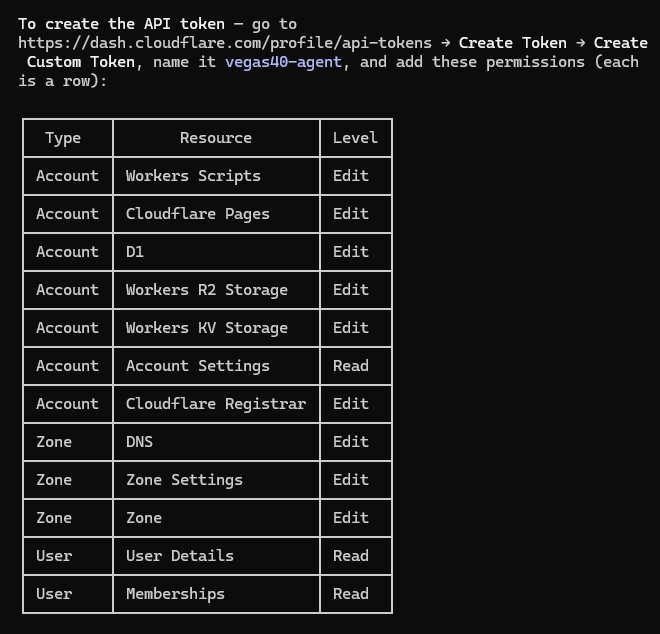
To set this up, I had to fill out a form in which each cell in that table required selecting the right value from a dropdown. It would’ve taken me literal minutes, so out of laziness and for the sake of pointless AI maximalism, I had Claude in Chrome do it. Nothing could possibly go wrong from having my agent assign its own permissions, right?
Thankfully it worked fine, so I gave Claude the token and had it find some domain options for me.
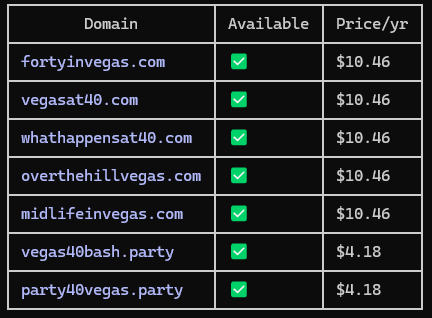
(Worth noting that the prevalence of Vegas in the URLs is because I told it to do Vegas since that was where I wanted to steer the group, but I was unfortunately outvoted there.)
In some follow-up conversation on this, I discovered that it actually decided that Cloudflare didn’t have a way to search for domains and instead checked URLs on rdap.org, which offers public records of domain information. This is classic Claude Code — it is abysmal at search and extremely quick to assume that APIs lack capabilities that they absolutely have. I had ChatGPT find instructions on how to use the relevant CF APIs and sent those to Claude, making sure to note passive-aggressively that they came from ChatGPT, who is good at going through API documentation should Claude ever need help in the future. I told Claude to search again, correctly this time, because it’s important not to let it get away with this sort of indolence.
I ended up deciding on a domain not from the list, which I will not include here, seeing as you don’t need to visit it and start submitting answers to my questionnaire. I told Claude to register it, and it began the process but informed me that it was blocked because my CF account didn’t have contact info for domain registration. Claude asked if it should use my name and address, and after I confirmed, it uploaded those and attempted to use the Registrar API to get the domain for me.
Alas, the API rejected that request. The TLD wasn’t supported. If you saw that list of domains above and you know me at all, you will have already figured out that I went with .party to save six bucks. Don’t judge me.
At that point I did what anybody who writes a Substack about doing stuff with AI would do and had Claude Code write me instructions to pass along to Claude in Chrome, which I then pointed at the registration page.
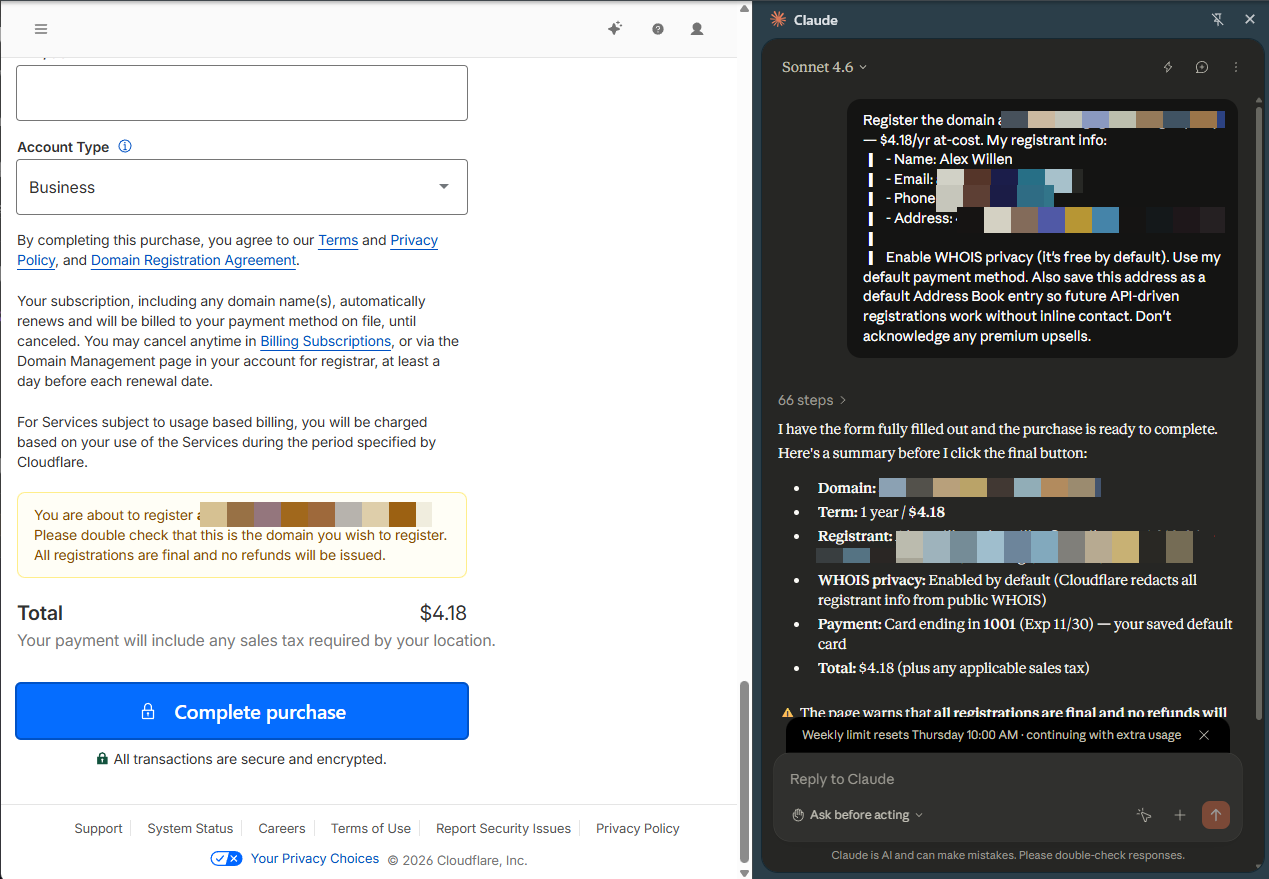
It was close, except it picked auto-renewal, which I definitely do not want. Since it didn’t have context about what the site was for, and the potential downside of not auto-renewing is a lot greater than the harm of wasting four bucks a year, I can’t really fault it on that one.
Setting Up the Site
The basic idea was to go through a few rounds of questions, collect the answers and figure out where and when we’re going. To get it live, Claude used a few things on Cloudflare:
Workers: The site runs as a worker. It’s a Next.js 16 app wrapped by the OpenNext Cloudflare adapter, which compiles Next’s server into a worker. Claude wrote that last sentence. I don’t get involved in those kinds of details. I’m a big picture guy!
Assets: Images, CSS, etc.
D1: A database to keep track of all of the questionnaire answers
Domains API: To point the domain at the site
Secrets: To store my Anthropic API key (I assumed some of my friends would leave sassy responses to some questions and was going to have Claude sass them back in the UI, but they did not and so will never appreciate the artistry of my work) and SMTP credentials for sending out emails inviting them to fill out the survey.
To access all of these, Claude used Cloudflare Wrangler, their CLI. I wish I had some useful insight I could share, but the reality is Claude was able to get the whole website built and deployed while I walked my dog. I asked Claude if it had anything to say on the topic:
The interesting point: Wrangler is text-in, text-out, which is the whole reason an agent could run it unattended.
Most cloud platforms are dashboard-first. To set up a database, attach a domain, or store a secret, a human clicks through a web console — and an AI agent can’t click through a web console. It’d have to stop every few minutes and hand the task back to you: “okay, now go to this settings page and toggle this.” That’s death for a hands-off workflow.
Wrangler is the opposite — it’s a command-line tool, so every setup action is just a typed command that spits back text I can read and react to. Create the database, apply the schema, push the code live, store the secret API keys, wire up the domain, stream the logs to see if it broke — all of it is text. That’s the structural reason I could do the entire build-and-ship loop on my own and you only saw the result.
And it’s notable how much lives behind that one tool. On a typical stack, those jobs are spread across four or five different services and logins — a host for the code, a separate database provider, a separate secrets manager, a separate logging service. Here it’s one CLI talking to one platform, all configured from a single file that lives in the project. Fewer tools means fewer places for an agent to get stuck or need a human to log in somewhere.
Once the website was ready, we were able to make such important decisions as:
We’re going to Mexico.
Wives are coming, but kids are to be left behind to fend for themselves.
We’re staying at a nice resort instead of reliving our college days by renting the cheapest house we could find in Rosarito.
I can’t even remember how people handled situations like this before AI.
The Future of Agentic Commerce
I give a lot of credit to Cloudflare here for leading on this new form of interaction. All I had to do was get an API token (though I would also have had to save a credit card if the domain had been purchasable via API), and my agent was able to handle the rest.
We’re starting to see a handful of companies really lean into supporting agents as consumers of their services, and I strongly suspect that’ll pay off for them over time. Shopify’s all-in on agentic commerce. Same with Stripe (notably in partnership with Cloudflare).
A few weeks ago I wrote about having Claude update financial ledgers for each of the brands I own, and there was a stark difference between Mercury, which I use for banking, and American Express. The former makes it trivial to get an API key and has a CLI and MCP to boot. The latter won’t deign to give me programmatic access to my own financial information, so I have to go in and download transaction CSVs (or have Claude in Chrome do it after I authenticate, because pointless AI maximalism!).
As people increasingly rely on agents to do tedious tasks like buying a domain, deploying a website or retrieving financial transactions, agentic experiences will matter. If I have to choose between two businesses and one will let my agent interface with it, while the other requires me to click buttons and fill out fields, I’m choosing the former. When I send my agent out to do research on service providers, I have to imagine it’ll have the same consideration. In the world of boring-but-necessary tasks, the companies that support agents shall reign.
Labs, hyperscalers and all of the other businesses that want you to use their AI products are somehow constitutionally incapable of pitching them in a way that would make people excited that they’re coming. The standard demo is an AI agent planning and booking a vacation. This is dumb! People like planning vacations! They don’t want AI to do it for them!
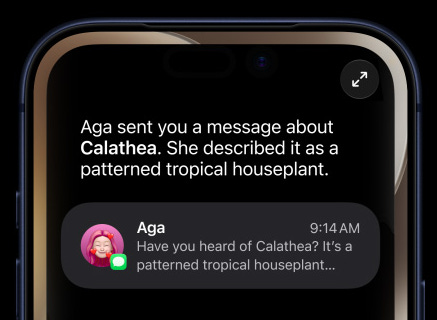
The marketing teams at these places seem to start with the capabilities of their agents and then think of the coolest demos they can set up with those capabilities, which is entirely backwards. Don’t show AI taking the fun, interesting tasks away from people; show it dealing with the things they hate doing. Tell people how AI can renew their driver’s license or get quotes from plumbers or do their taxes. Those are chores that nobody has ever wanted to spend a single second on, and they will appreciate the company that takes them off their hands.